
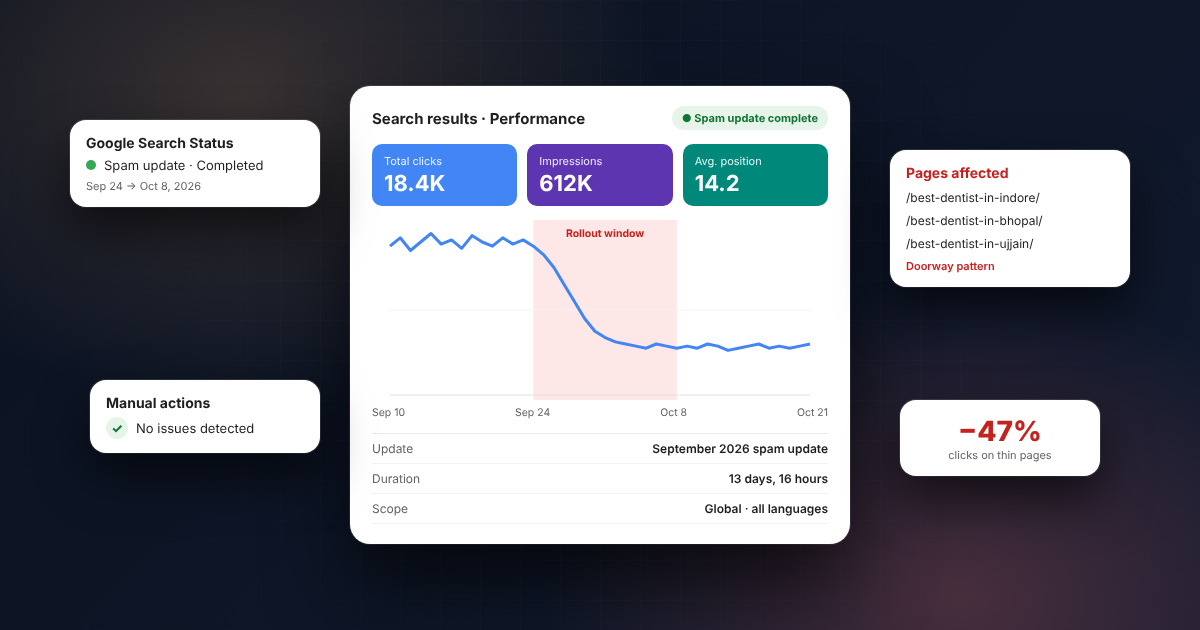

Google’s September 2026 spam update officially finished rolling out on October 8, 2026. It started on September 24, so it took 13 days and 16 hours, much longer than any other spam update this year.
If your traffic moved in the last three weeks, this guide explains what happened, how to tell whether this update caused it, and what to do next.
Quick facts
| Name | September 2026 spam update |
| Started | September 24, 2026 |
| Completed | October 8, 2026 |
| Duration | ~13 days, 16 hours |
| Scope | All languages, all countries (including India) |
| Type | A “normal” spam update, not a link spam update |
| Updates this year | 4th spam update of 2026 (after March, June and August) |
Why this update was unusual
In 2026, spam updates had been quick:
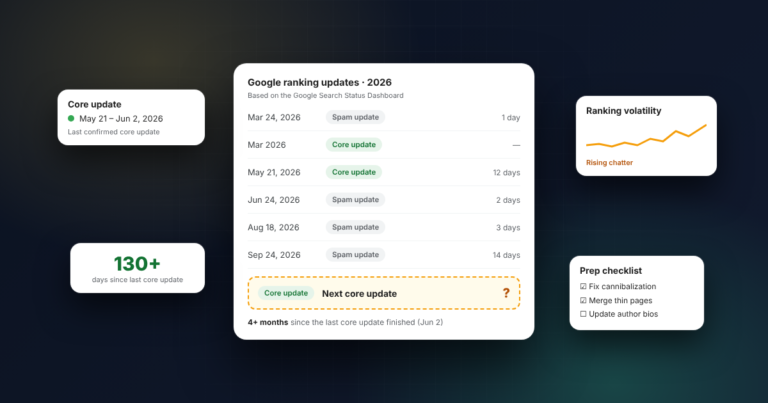
- March 2026: completed in about 19.5 hours, the fastest spam rollout on record
- June 2026: June 24–26
- August 2026: August 18–21
- September 2026: September 24 – October 8
Each of the earlier three finished within about three days. This one used almost the entire two-week window Google gave at launch. Google didn’t explain why, and it didn’t announce any change to its spam policies.
Four spam updates in seven months also makes 2026 the most active year for spam updates in a long time. That makes it harder to tell which update caused which ranking change, so it’s worth checking carefully instead of guessing.
What does a spam update actually target?
Google’s spam detection runs all the time. A “spam update” is the name Google gives to a notable improvement in those automated systems (largely its AI-based system, SpamBrain).
This update was not labelled a link spam update, so its focus is on-site spam policy violations. Based on Google’s published spam policies, the usual suspects include:
- Scaled content abuse: mass-producing pages (AI-written or not) mainly to rank, with little value for users
- Doorway pages: many near-identical pages targeting slightly different keywords or cities, all funnelling to the same place
- Site reputation abuse: third-party content hosted on a strong domain only to borrow its ranking power
- Expired domain abuse: buying old domains to host low-value content
- Cloaking and hidden text: showing Google something different from what users see
- User-generated spam: spammy comments, forum posts, or profiles left unmoderated
The doorway page trap I see most in India
The most common risk I see on Indian business sites is city-page spam: 50 pages like “best dentist in [city]” with the same text and only the city name swapped.
The fix isn’t deleting everything. It’s having one strong page per real intent, and only creating location pages where you actually have something unique to say: a real address, local reviews, local photos, or local case studies. I explain the full process in One Keyword, One Page: How I Map Keywords Before Building a Site.
How to check if the September 2026 spam update hit your site
Step 1: Compare the right date ranges in Google Search Console. Open Performance → Search results. Compare:
- Before: September 10 – September 23
- After: October 8 – October 21 (once the data is in)
Step 2: Look for a pattern, not just a drop. A drop across the whole site that starts during the rollout window points to the update. A drop on a handful of pages may have other causes, such as a competitor improving, seasonality, or Diwali and festive-season search shifts.
Step 3: Check Manual Actions. Go to Security & Manual actions → Manual actions. A spam update is algorithmic, so you won’t get a notice for it. If you do see a manual action, that is a separate (and more serious) issue.
Step 4: Rule out technical problems. Before blaming the algorithm, make sure Google can still crawl and index your pages properly. Server errors, rendering problems and wasted crawl budget can look exactly like a penalty. Here’s what to check: Is Your Site Wasting Its Crawl Budget?
Step 5: Remember that a dip doesn’t automatically mean the update caused it. Ranking movement happens all the time. Only connect a drop to the update when the timing and the pattern both match.
How to recover from a spam update
- Read Google’s spam policies against your own site. Be honest about pages that exist only to rank.
- Remove or merge thin and duplicate pages. Consolidate similar pages into one strong page and use 301 redirects. If you’re nervous about restructuring, here’s how I did it on a commercial site without losing rankings: How I Rebuilt a Commercial Site’s URL Structure.
- Clean up user-generated content. Close or moderate open comment sections and forums.
- Stop publishing AI content in bulk without editing it. AI tools are fine; publishing hundreds of unedited, unoriginal pages is the problem.
- Be patient. Google says that if a site fixes its issues, its automated systems can learn over a period of months that the site now complies. There’s no “reconsideration request” for algorithmic spam demotion.
One important note on links: if a site gained rankings from spammy links, Google’s position is that the benefit from those links is lost permanently once its systems neutralise them. Cleaning up won’t bring that benefit back. You need new, genuine authority.
Is a core update coming next?
Possibly. Google has sometimes released a core update shortly after a spam update, but not always. I’ve broken down the history and what to prepare for in Next Google Core Update 2026: Is One Coming Soon?
FAQs
Did the September 2026 spam update affect Indian websites?
Yes. Google said it applies globally and to all languages.
Was this a link spam update?
No. Google didn’t label it as one, and it doesn’t appear to target links specifically.
My traffic dropped. Should I disavow links?
Not as a first step. This wasn’t a link spam update. Focus on content quality and spam policy issues first.
How long does recovery take?
Usually months, not weeks. Google’s systems need time to see that a site consistently follows its policies.
Seeing a drop and can’t tell if it’s the spam update or something else? Message me for a free SEO audit. I’ll check your Search Console data and tell you what’s actually going on. You can also see all my SEO services.


[…] September 2026 spam update finished on October 8. Now the question across SEO groups is: is a core update coming […]